Forge Pages
CI/CD agnostic static web page server
What is Forge Pages?
Forge Pages is a tool that provides CI/CD-driven deployment of static pages for Forgejo and Gitea – in other words, a counterpart to services such as GitHub Pages – but specifically for Git forges such as Forgejo and Gitea.
There are already other tools that take a similar approach, but these require the static website content to be stored in the repository itself (e.g., in a dedicated branch). This is particularly impractical for single-page applications: You would either have to rebuild them manually every time you make a change, or automate this via CI/CD, which then has to push to the repository (anyone who has ever done this knows what a pain it is to push from a CI/CD pipeline to a private repo), only to then wait for the pages server to pull the branch again to deploy the page. In addition, every commit to this branch makes the repository bigger. Nobody wants that.
In addition, an important feature that I really liked about GitLab Pages was missing: mirroring repository permissions to page deployments. If a page deployment is created in GitLab from a private repository, this page can only be accessed with a login and the appropriate read permissions.
Forge Pages does exactly that: It uses the identity provider from Forgejo or Gitea to enable login via OAuth2 for private pages. After login, Forge Pages receives an access token from Forgejo or Gitea, which can be used to verify if the user has the correct permissions for the repository from which the deployment originates.
How does it work?
Forge Pages is installed on a server with a domain with subdomain wildcards (e.g., *.pages.example.com). The deploy endpoint pages.example.com/deploy is then provided there. A .tar.gz archive can be transferred to this endpoint via HTTP POST, together with an access token (e.g., a CI/CD token) and the repository slug of the project (e.g., owner/repo). Forge Pages then checks whether the access token has write permissions in the specified repo and creates the deployment at <owner>.pages.example.com/<repo>. An additional parameter can be used to specify whether the deployment should be secured via OAuth2 or whether it should be public.
When the URL is visited, Forge Pages searches for the correct deployment based on the owner subdomain and the repo path. If the deployment is configured as private, Forge Pages first enforces an OAuth2 login with the configured identity provider. The identity provider then issues an access token to Forge Pages for the user, which is used to check what rights the user has to the associated repository. If the user has at least read permissions, Forge Pages delivers the page, otherwise it rejects the request.
Use Forge Pages with the Forgejo Action
Since creating such a .tar.gz archive and then uploading it via HTTP in a CI/CD pipeline doesn’t look very nice, there is a matching Forgejo action. The action uses the CI/CD token automatically and determines the name of the repository. A workflow for building and deploying a Hugo page could look like this, for example:
on:
  push:
    branches:
      - main

jobs:
  deploy-frontend-to-pages:
    runs-on: alpine-node-lts
    steps:
      # Checkout and install dependencies
      - name: Checkout
        uses: actions/checkout@v6
      - name: Install dependencies
        run: apk add git hugo
      # Build Hugo page and adjust the pages base URL
      - name: Compile page
        run: hugo --baseURL "https://owner.pages.example.com/repo/" --gc --minify --cleanDestinationDir
      # Deploy using the Forge Pages Action
      - name: Deploy to Forge Pages
        uses: https://code.leon.wtf/leon/Forge-Pages-Action@v1
        with:
          content: public # local root folder of the static page
          to_host: https://pages.example.com
          protect: true # enable OAuth2 protection
Here is a screenshot of such a deployment using the Forge Pages Action in another repository with a slightly more complex setup:
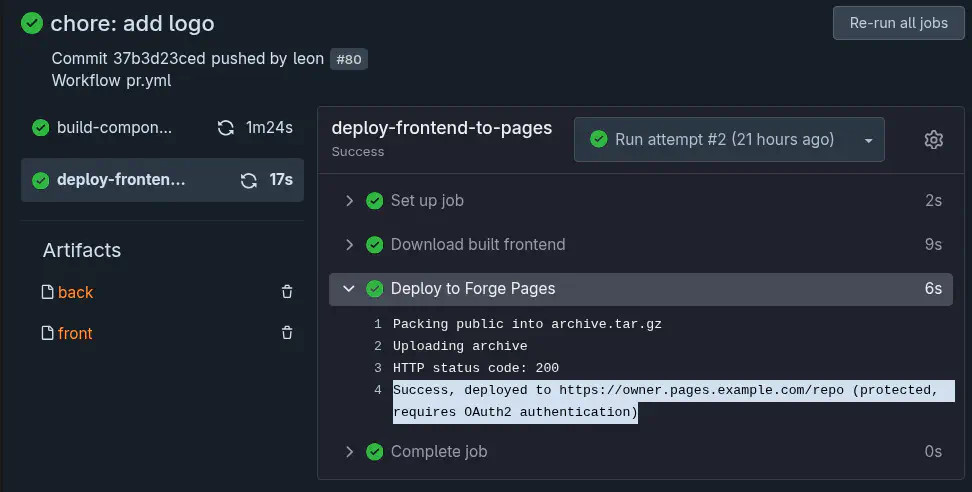
Forge Pages is extremely useful for things like internal documentation or staging environments for websites. In fact, that’s exactly how I use Forge Pages myself: pull requests for new content for leon-schmidt.dev are deployed to different subdirectories via Forge Pages, allowing me to work on different things in parallel. If I want to have an article reviewed, I can simply add the reviewer to the repository with read permissions. Forge Pages then forces that person to log in via OAuth2, checks the token, and either lets the person in or not. So in the end, I have a fully integrated Pages environment with login, without ever having to touch Forge Pages itself – everything is mapped via Forgejo or Gitea.
If you want to use Forge Pages yourself: It’s open source! Instructions for installation and configuration can be found in the README.md in the repo. You can find the action here. By the way: Since the action’s repository is public, it can also be used from GitHub Actions or other Forgejo or Gitea instances!